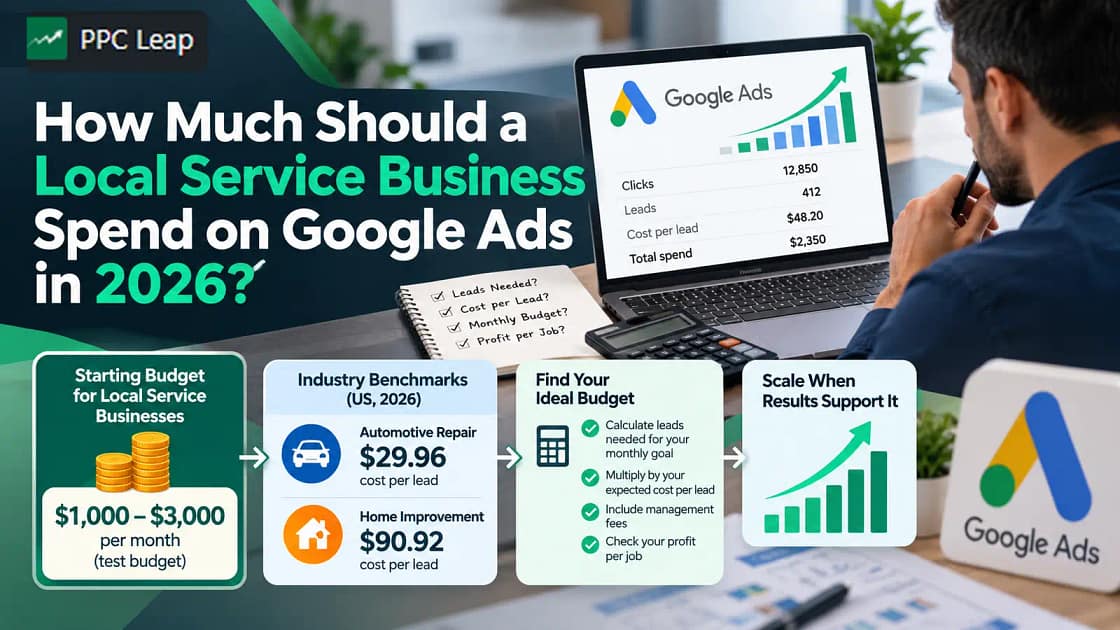
A local service business can consider $1,000–$3,000 per month as a starting Google Ads test budget, but some industries need more. In 2026, US search advertising benchmarks show a median cost per lead of $29.96 for automotive repair and $90.92 for home improvement. To find your ideal budget, calculate how many leads you need to reach your monthly booking goal, then multiply that number by your expected cost per lead. Include management fees, check your profit per job, and increase spending only when your results support it.
What Is a Good Monthly Google Ads Budget for a Local Service Business?
A good Google Ads budget is one that helps your business win enough paying customers without spending more than you can afford.
Google has no fixed minimum advertising spend. You choose your average daily budget and can change it as your needs change.
However, setting a budget and having enough money to test a campaign properly are two different things.
A business spending $500 may generate several inquiries in a lower-cost market. The same budget might produce only a few leads for a competitive home improvement service.
Here is a practical way to assess different starting budgets:
| Monthly Ad Spend | What the Budget May Allow |
| $500 | A small test for one service in a limited area |
| $1,000–$1,500 | A focused campaign with more room to collect leads |
| $1,500–$3,000 | A larger test for local services with steady search demand |
| $3,000–$5,000 | More lead volume for businesses in competitive markets |
| $5,000+ | Wider coverage or additional services when results support growth |
These are illustrative budget levels, not official Google recommendations or guaranteed industry spending ranges.
A small cleaning company seeking five additional jobs may not need the same monthly investment as a roofing company trying to book 20 inspections.
The right amount depends on what leads cost in your area, how many become customers, and how much profit those customers bring.
Start with the number of jobs you need, not a random advertising budget.
How Much Does Google Ads Cost by Industry in 2026?
Google Ads costs depend partly on the type of service you advertise.
For standard Google Search campaigns, advertisers commonly pay when someone clicks an ad. This is called cost per click (CPC).
However, a click is not the same as a customer inquiry.
Cost per lead (CPL) measures how much advertising money you spend to generate a tracked inquiry or lead action.
For a local business, that could include a phone call, quote request, or contact form submission.
Understanding both costs helps you estimate how far your monthly advertising budget may go.
Average Google Ads CPC and CPL in 2026
WordStream and LocaliQ analysed 13,474 US-based search advertising campaigns across 23 industries between April 2025 and March 2026.
The report includes data from Google Ads and Microsoft Ads. Its reported averages are median results, making them useful industry reference points rather than guaranteed Google Ads prices.
| Business Category | Median Cost Per Click | Median Cost Per Lead |
| Automotive Repair & Services | $4.35 | $29.96 |
| Personal Services | $7.17 | $54.60 |
| Dental Services | $8.00 | $72.97 |
| Industrial & Commercial | $5.87 | $75.19 |
| Home & Home Improvement | $8.33 | $90.92 |
| Business Services | $5.87 | $93.69 |
| All Industries | $5.42 | $66.69 |
These figures show why one monthly budget cannot suit every service business.
For example, the home improvement category has a median cost per lead of $90.92. Automotive repair has a much lower median of $29.96.
At those costs, a $1,000 advertising budget could generate approximately 11 home improvement leads or 33 automotive repair leads.
These are estimates based on broad industry categories, not predictions for individual businesses.
A plumbing, roofing, cleaning, or pest control company may pay more or less than the home improvement benchmark.
Local competition, keywords, advertising quality, and customer demand can all change the actual cost.
How Many Leads Can Different Google Ads Budgets Generate?
The number of leads you receive depends on your cost per lead.
Here is an example using the 2026 home improvement benchmark of $90.92 per lead.
| Monthly Google Ads Spend | Estimated Leads |
| $500 | 5 |
| $1,000 | 11 |
| $1,500 | 16 |
| $2,000 | 22 |
| $3,000 | 33 |
| $5,000 | 55 |
Figures are rounded mathematical estimates using a constant $90.92 CPL. Real campaigns may produce different results.
Even if your campaign achieves these numbers, not every lead will become a paying customer.
That is why your next step should be calculating the number of leads needed to reach your booking goal.
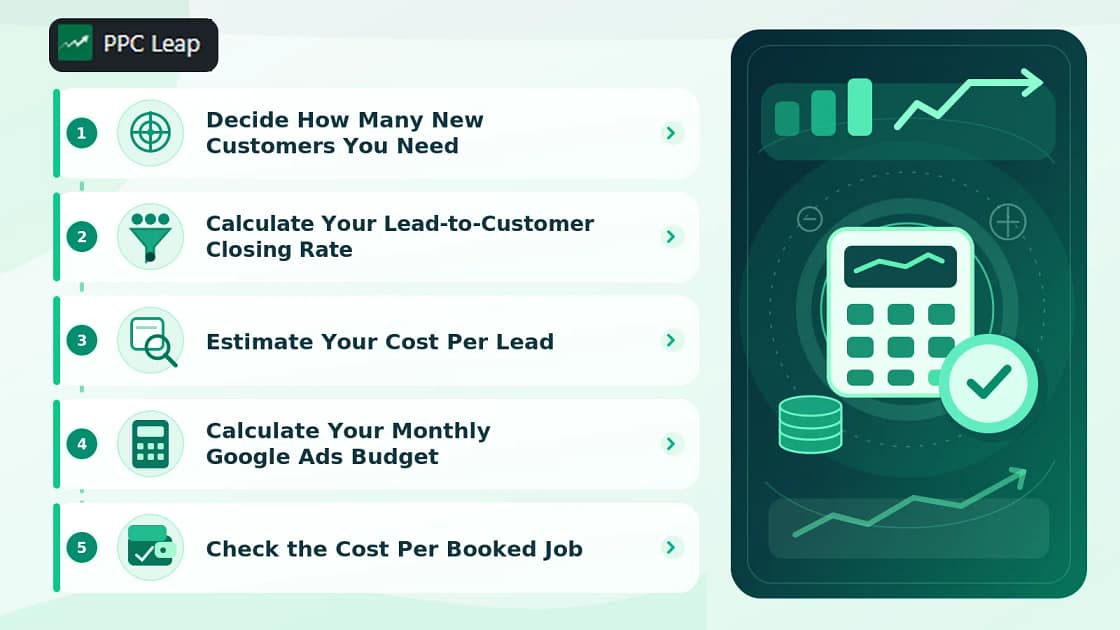
How to Calculate the Right Google Ads Budget for Your Business
You do not need a complicated tool to estimate your monthly advertising budget.
Start with three things:
- The number of new jobs you want.
- The percentage of leads that become customers.
- The amount you expect to pay for each lead.
Then use these numbers to work backward from your sales goal.
Step 1: Decide How Many New Customers You Need
First, look at how much additional work your business can handle.
Suppose you own a cleaning company and want 10 new bookings next month.
You have enough cleaners, equipment, and available time to complete those jobs.
Your target is therefore 10 new customers.
If your team can only handle five additional jobs, setting a much higher target may waste money and create scheduling problems.
Choose a realistic goal before calculating what to spend.
Step 2: Calculate Your Lead-to-Customer Closing Rate
Your closing rate tells you how many inquiries become paying customers.
For example, a customer might call to request a cleaning quote, but they may decide not to book.
If your business receives 40 inquiries and books 10 jobs, your closing rate is 25%.
Closing Rate = (Customers ÷ Leads) × 100
10 ÷ 40 × 100 = 25%
At this rate, you need four leads to win one customer.
You can now calculate the number of leads required for your monthly target.
Required Leads = Target Customers ÷ Closing Rate
10 ÷ 0.25 = 40 leads
Your business needs approximately 40 leads to reach its goal of 10 booked jobs.
Use your own sales records for this calculation whenever possible.
Step 3: Estimate Your Cost Per Lead
Your next step is estimating how much each lead may cost.
If you already advertise on Google, review your past campaign data.
Look at how much you spent and how many valid inquiries you received.
For example, if you spent $1,500 and received 20 leads:
Google Keyword Planner can help you check local search demand and estimated advertising costs for your services.
$1,500 ÷ 20 = $75 per lead
If your business has never advertised before, use relevant industry benchmarks and Google Keyword Planner as starting points.
For this example, assume your expected cost per lead is $75.
Step 4: Calculate Your Monthly Google Ads Budget
Now multiply the number of leads you need by your expected cost per lead.
Monthly Ad Budget = Required Leads × Cost Per Lead
40 × $75 = $3,000
Your estimated monthly advertising budget is $3,000.
Here is the full calculation:
| Budget Calculation | Result |
| Target customers | 10 |
| Expected closing rate | 25% |
| Required leads | 40 |
| Estimated cost per lead | $75 |
| Monthly Google Ads spend | $3,000 |
The calculation gives you a starting budget based on your actual business goal.
It does not guarantee 40 leads or 10 customers. Your results may change as the campaign runs.
Step 5: Check the Cost Per Booked Job
Before committing to the budget, check whether the new jobs can cover your advertising costs.
Suppose each completed job produces $600 after direct labour, materials, and other job costs.
Ten jobs would generate $6,000 before marketing expenses, fixed overhead, and taxes.
Now assume you spend $3,000 on Google Ads and pay an additional $500 for management.
| Item | Amount |
| Contribution from 10 completed jobs | $6,000 |
| Google Ads spend | $3,000 |
| Example management fee | $500 |
| Total marketing cost | $3,500 |
| Amount remaining before fixed overhead and taxes | $2,500 |
Your total marketing cost per booked job is:
$3,500 ÷ 10 = $350
That leaves $250 per job after the stated marketing costs, before fixed overhead and taxes.
Whether that is profitable depends on your remaining operating expenses.
What Is the Maximum You Can Afford to Pay for a Lead?
This is another useful calculation that many business owners overlook.
Suppose a completed job produces $600 before marketing expenses.
You want to keep at least $150 per job after marketing, before fixed overhead and taxes.
Your expected management cost is $50 per booked job.
That leaves:
$600 − $150 − $50 = $400
You can therefore afford up to $400 in Google Ads spend for each booked customer while meeting that target.
With a 25% closing rate:
Maximum Affordable CPL = Available Ad Spend Per Customer × Closing Rate
$400 × 0.25 = $100
Your target cost per lead would be $100 or less under these assumptions.
If you generate leads for $75 each, you have room within your target.
If your leads cost $130 each, you may need to improve your closing rate, focus on more profitable jobs, or adjust your advertising plan.
This calculation helps you set a budget based on the money your business needs to keep—not only the leads you want to generate.
How Does Google Ads Calculate Your Daily Budget?
Google Ads generally asks you to set an average daily budget for each campaign.
This is the amount you are comfortable spending per day on average over a month.
To convert a monthly budget into an average daily budget, divide it by 30.4.
Average Daily Budget = Monthly Budget ÷ 30.4
Here are some common examples:
| Monthly Advertising Budget | Average Daily Budget |
| $500 | $16.45 |
| $1,000 | $32.89 |
| $1,500 | $49.34 |
| $2,000 | $65.79 |
| $3,000 | $98.68 |
| $5,000 | $164.47 |
Google uses 30.4 because that is the average number of days in a month.
Can Google Spend More Than Your Daily Budget?
Yes.
For most campaigns, Google can spend up to twice your average daily budget on days when more traffic is available.
For example, if you set a $50 daily budget, Google may spend up to $100 on a busy day.
However, the normal monthly spending limit for that campaign is $50 × 30.4, or $1,520, provided the budget stays unchanged.
Changing budgets during the month can change the applicable limits.
Also, remember that each campaign may have its own budget. If you run three campaigns, check their combined spending rather than looking at only one.
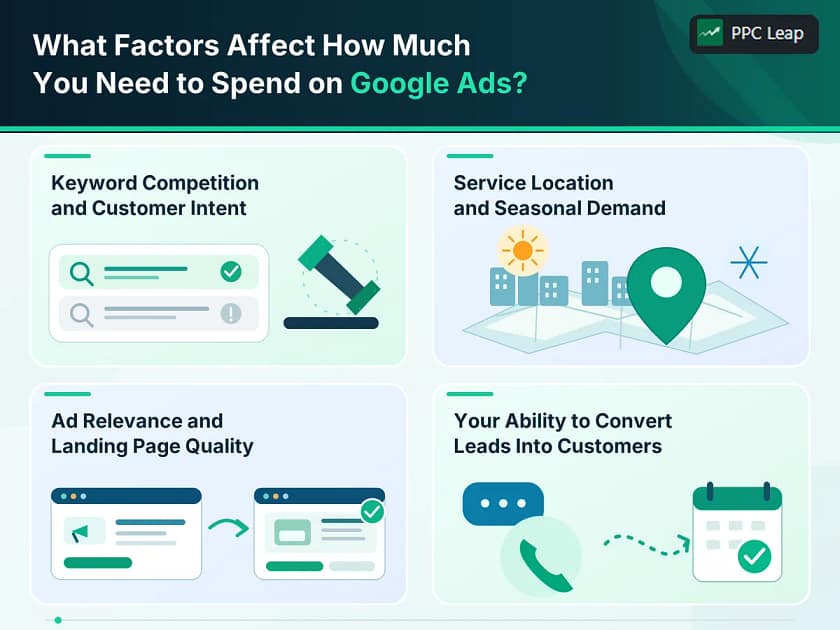
What Factors Affect How Much You Need to Spend on Google Ads?
Your industry is not the only reason advertising costs change.
Even businesses offering the same service can have different costs because of where, when, and how they advertise.
Keyword Competition and Customer Intent
Google uses an advertising auction to decide which eligible ads appear for a search.
Your bid matters, but Google also considers ad relevance, landing-page quality, competition, and the context of the search.
For example, someone searching for “emergency plumber near me” may be ready to hire a plumber immediately.
Someone searching for “how to fix a leaking tap” may only want instructions.
Both searches relate to plumbing, but they do not have the same buying intent.
High-intent keywords can attract stronger competition. Their higher costs may still make sense when they lead to valuable jobs.
Service Location and Seasonal Demand
Advertising costs can change from one area to another.
A roofing business targeting a large city may face more competition than a similar company operating in a small town.
Seasonal demand also matters.
Air conditioning companies may receive more service searches during hot weather, while pest control companies may see demand change with seasons and local conditions.
Your budget should reflect when customers need your services and where your team can actually work.
Ad Relevance and Landing Page Quality
Google evaluates how closely your advertisement matches the user’s search and whether the landing page is helpful.
Imagine someone searches for commercial carpet cleaning.
They click an ad but land on a general homepage that mostly discusses house cleaning.
The visitor may leave without inquiring.
A page focused on commercial carpet cleaning would provide a clearer answer to their search.
This is why relevant ads and landing pages designed to convert visitors into leads are important parts of a paid advertising campaign.
A better landing-page experience may help improve lead conversion, although it cannot guarantee cheaper clicks or more customers.
Your Ability to Convert Leads Into Customers
Some advertising costs happen after the click.
For example, your campaign might generate several genuine inquiries, but your team may miss calls or take too long to send quotes.
The leads have already cost money, even if nobody books a job.
Improving how your business answers calls, handles quotes, and follows up can increase the percentage of leads that become customers.
This can reduce your cost per booked job without requiring more advertising spend.
Should You Spend Your Budget on Search Ads or Local Services Ads?
Local service businesses may have more than one advertising option on Google.
The main difference is how those options are priced and managed.
Standard Google Search Ads generally use pay-per-click pricing. You select keywords, write ads, set targeting, and pay for eligible clicks.
Local Services Ads (LSAs) use a pay-per-lead model for eligible businesses and services. They focus on generating customer inquiries rather than charging for each standard search-ad click.
What Changed for Local Services Ads in 2026?
Google began moving eligible Local Services Ads accounts into specialised Performance Max campaigns with pay-per-lead goals in 2026.
The change brings Local Services advertising into the main Google Ads platform while keeping its specialised lead-based billing approach.
Google’s migration guidance also explains that historical weekly budgets are converted into average daily budgets.
This specialised campaign type should not be confused with every general-purpose Performance Max campaign.
You can review the details in Google’s official Local Services Ads transition guide.
For a local service business, the choice depends on service eligibility, location, the type of leads needed, and how much control you want over keywords and landing pages.
Compare actual lead quality and the cost per booked customer rather than assuming one campaign type will always be cheaper.
Are There Any Additional Costs Besides Google Ads Spend?
The money paid to Google is only one part of your advertising investment.
Depending on your setup, you may also have costs for campaign management, landing pages, call tracking, or other tools.
Google Ads Management Fees
An agency or PPC specialist may charge a flat monthly fee, an hourly rate, or a percentage of ad spend.
Fees vary depending on the work involved and the size of the account.
For example, a business might spend $2,000 directly on Google Ads and another $500 on campaign management.
Its combined monthly cost would be $2,500.
The $500 fee is an example, not an industry-wide standard price.
Setup, Landing Page, and Tracking Costs
A new campaign may also require:
- Conversion tracking setup.
- A dedicated landing page.
- Call tracking or CRM software.
- Website updates or form improvements.
Some expenses are one-time costs, while others continue each month.
Before hiring an agency, ask for a clear breakdown of what is included in the fee.
You should also retain appropriate ownership and administrative control of your Google Ads account, website, landing pages, and analytics properties.
Your total budget should show both the amount paid to Google and the costs of managing the system.
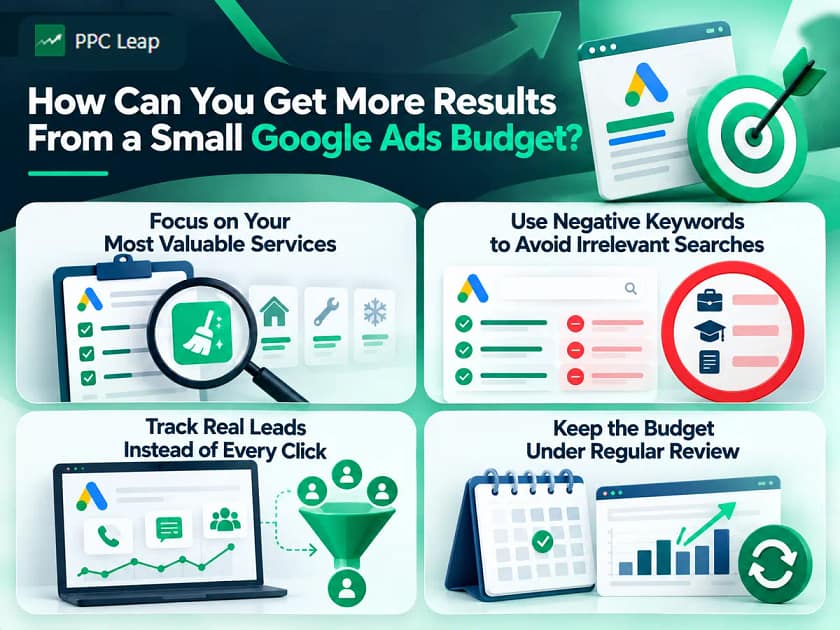
How Can You Get More Results From a Small Google Ads Budget?
When your budget is limited, spreading it across too many services and locations may leave each campaign with very little data.
The better approach is to focus on a smaller number of useful opportunities and check what those campaigns actually produce.
Focus on Your Most Valuable Services
Choose services with clear search demand and enough profit to support paid advertising.
For example, a cleaning company might focus its initial campaign on regular commercial cleaning contracts rather than advertising every cleaning service at once.
This can make it easier to understand which inquiries come from the campaign and whether the work is profitable.
Use Negative Keywords to Avoid Irrelevant Searches
Negative keywords help prevent your ads from appearing for searches that do not fit your business.
For example, a pest control company might receive searches from people looking for pest control jobs or training courses.
If the business only wants customers needing pest removal, those searches may be irrelevant.
Review your search terms regularly and exclude unsuitable queries when appropriate.
Do not block broad words without checking whether they also appear in valuable searches.
Track Real Leads Instead of Every Click
Clicks tell you how many people visited your site.
They do not tell you how many customers you gained.
Check which calls and forms are genuine inquiries, which leads match your services, and how many become booked jobs.
Google Ads also supports reporting qualified leads and converted leads from customer management systems.
This can help you measure results beyond the initial contact form or phone call.
Keep the Budget Under Regular Review
Review campaign performance using cost per lead, lead quality, booked jobs, and profit.
If the campaign receives many clicks but few relevant inquiries, increasing spend may make the problem more expensive.
If it generates profitable customers and your team has available capacity, a larger budget may be worth testing.
PPC Leap provides Google Ads management for local service businesses, including keyword targeting, conversion tracking, campaign monitoring, and budget optimisation.
How Long Should You Test a Google Ads Budget Before Increasing It?
A new campaign needs enough time to collect useful information before you can judge the results.
Some businesses receive inquiries soon after launching. Others need more time because their search demand is lower or customers take longer to make a decision.
A practical approach is to plan for at least a full month of advertising and continue longer if you do not have enough useful data.
That is a planning recommendation, not a fixed Google Ads learning period.
Google recommends allowing for conversion delays when reviewing Smart Bidding performance. For bidding changes, it often advises looking at one or two complete conversion cycles before making a judgment.
A conversion cycle is the time it normally takes someone to complete your tracked action after clicking an ad.
For example, an emergency plumber may receive calls quickly, while a roofing customer may take longer to arrange an inspection and approve a quote.
When Should You Increase the Budget?
Consider increasing your advertising budget when you have evidence that:
- Your campaign generates qualified leads at an acceptable cost.
- Enough of those leads become profitable jobs.
- Your business has room to take on more customers.
- Additional search demand is available.
- Your current campaigns are performing consistently.
A campaign being marked “Limited by budget” does not automatically mean you should spend more.
First, check whether the customers it generates are worth the cost.
If the campaign is profitable but has room to reach more suitable customers, test a budget increase and monitor the results.
If your leads are poor quality or too expensive, improve the campaign before committing additional money.
Real Google Ads Example – PPC Leap’s UK Cleaning Business Campaign
PPC Leap has published a case study involving a UK local cleaning company that was starting Google Ads without previous campaign history.
The campaign targeted searches for several cleaning services and used a landing page focused on helping visitors contact the business.
PPC Leap also tracked different customer contact methods, including phone calls, WhatsApp interactions, and form submissions.
Reported Campaign Results
| Campaign Metric | Reported Result |
| Total tracked conversions | 63 |
| Reported cost per conversion | £22.16 |
| Phone call conversions | 23 |
| WhatsApp conversions | 31 |
| Form conversions | 9 |
| Client-reported closing rate | 80% |
Source: PPC Leap’s UK Cleaning Business Case Study
These results belong to one campaign in the UK market.
The 63 conversions include different contact actions. They should not be treated as 63 independently verified paying customers, and the client’s reported closing rate is not proof of final campaign profit.
The example shows why businesses should record different inquiry channels and connect them with their sales records.
Without proper tracking, a company may know how much it spent but struggle to identify which inquiries came from its advertising.
For accurate budget decisions, the next step is to compare those tracked inquiries with the jobs that were actually booked and completed.
Frequently Asked Questions
1. Is $500 a Month Enough for Google Ads?
Yes, $500 can support a limited Google Ads test. However, it may generate only a few leads in competitive industries. Use local keyword estimates to decide whether the budget can produce enough inquiries to evaluate results.
2. What Is the Minimum Budget for Google Ads?
Google does not set a universal minimum daily budget. You choose your spending amount. However, very small budgets may generate too few clicks or leads to measure performance reliably, especially for expensive service keywords.
3. What Is a Good Daily Budget for Google Ads?
A good daily budget depends on your monthly spending plan and expected lead costs. Divide your monthly budget by 30.4. For example, a $1,500 monthly budget equals approximately $49.34 per day.
4. How Long Should a Small Business Run Google Ads Before Judging Results?
Plan to review at least one month of results and allow longer when conversion data is limited. Consider your sales cycle, lead quality, booked jobs, and conversion delays before deciding whether to increase or reduce spending.
5. Should I Increase My Google Ads Budget If I’m Getting More Leads?
Not automatically. First, check whether those leads are qualified and becoming paying customers. Increase spending when customer acquisition remains profitable, enough demand exists, and your business can handle the additional work.
Final Recommendation
A local service business can use $1,000–$3,000 per month as an initial planning range, but the right Google Ads budget should come from your business numbers, not an industry-wide spending rule.
Start by deciding how many new customers you can serve. Calculate how many leads you need, estimate what those leads may cost, and check whether the expected jobs can cover your advertising expenses.
Use current industry benchmarks to guide your first estimates, but replace them with your own campaign results as soon as reliable data becomes available.
Remember that your total investment may include management, tracking, and landing-page costs. Measure booked jobs and remaining profit instead of judging success by clicks alone.
Need help planning your Google Ads budget? PPC Leap can review your service area, campaign setup, tracking, and customer goals to help identify a practical advertising approach. Book a free growth call to discuss your local business.