Google Ads helps small businesses reach potential customers who are searching for their services on Google. To get started in 2026, create a business-owned Google Ads account, choose a Search campaign, target your service area, select relevant keywords, set a daily budget, and track customer inquiries. For local service businesses, Search Ads are often a practical starting point because they reach people already looking for help. However, getting clicks is only the beginning. Your ads, landing page, and customer follow-up process must work together to turn those clicks into paying customers.
What Is Google Ads and How Does It Work for Small Businesses?
Google Ads is an online advertising platform that allows businesses to show paid advertisements across Google Search and other Google services.
For small service businesses, one of the most useful options is Google Search Ads.
These advertisements can appear when someone searches for a service that matches the business’s targeted keywords.
For example, imagine someone searching Google for “pest control near me.”
They may see sponsored results from pest control companies serving their area.
If they click one of those advertisements, they can visit the company’s website, request a quote, or find contact details.
The business pays for the click under the standard pay-per-click model.
This is called PPC advertising, which stands for pay-per-click.
How Does the Google Ads Auction Work?
Google Ads uses an automated auction to decide which eligible advertisements appear for a search.
Advertisers choose how they want to bid, while Google considers several factors when deciding which ads can appear and where.
These include the advertiser’s bid, the relevance of the advertisement, landing-page experience, search context, and the expected impact of ad assets.
The company offering the highest bid does not automatically win the best position.
A relevant advertisement linked to a useful service page may compete effectively with another advertiser offering a higher bid.
Google also provides a metric called Quality Score to help advertisers understand their keyword, ad, and landing-page relevance.
Quality Score is a diagnostic tool, not a direct input used in the ad auction.
For beginners, the main lesson is simple:
Choose relevant searches, write helpful ads, and send visitors to a page that matches what they need.
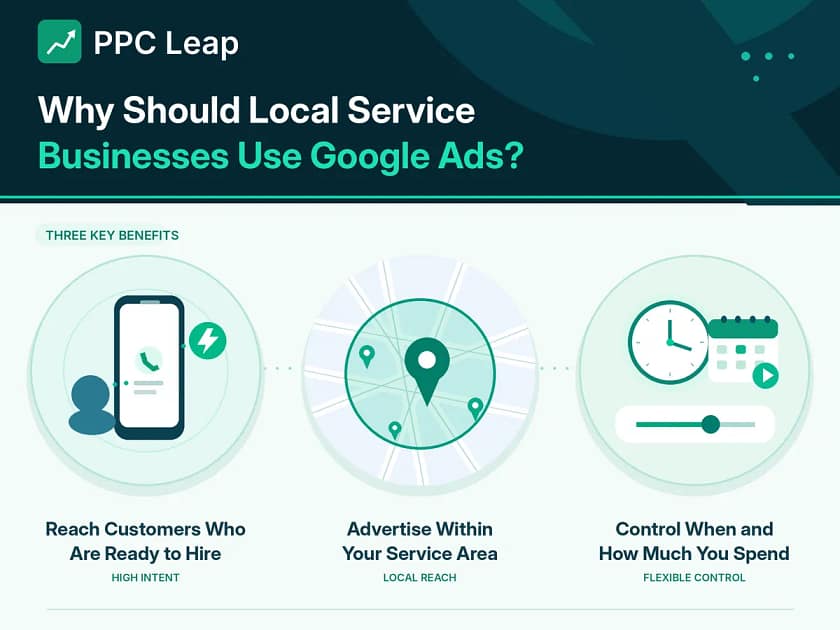
Why Should Local Service Businesses Use Google Ads?
Google Ads can help local businesses reach customers who are actively looking for services.
Unlike advertising that reaches people who may not need anything right now, Search Ads can appear when someone is trying to solve a specific problem.
There are three main reasons local service businesses consider using them.
Reach Customers Who Are Ready to Hire
Someone searching for “emergency electrician near me” may need help with an electrical problem.
A person searching for “commercial cleaning company in Dallas” may be comparing businesses before requesting a quote.
These searches suggest that the person already knows what they need.
Google Ads can help businesses appear during that decision process.
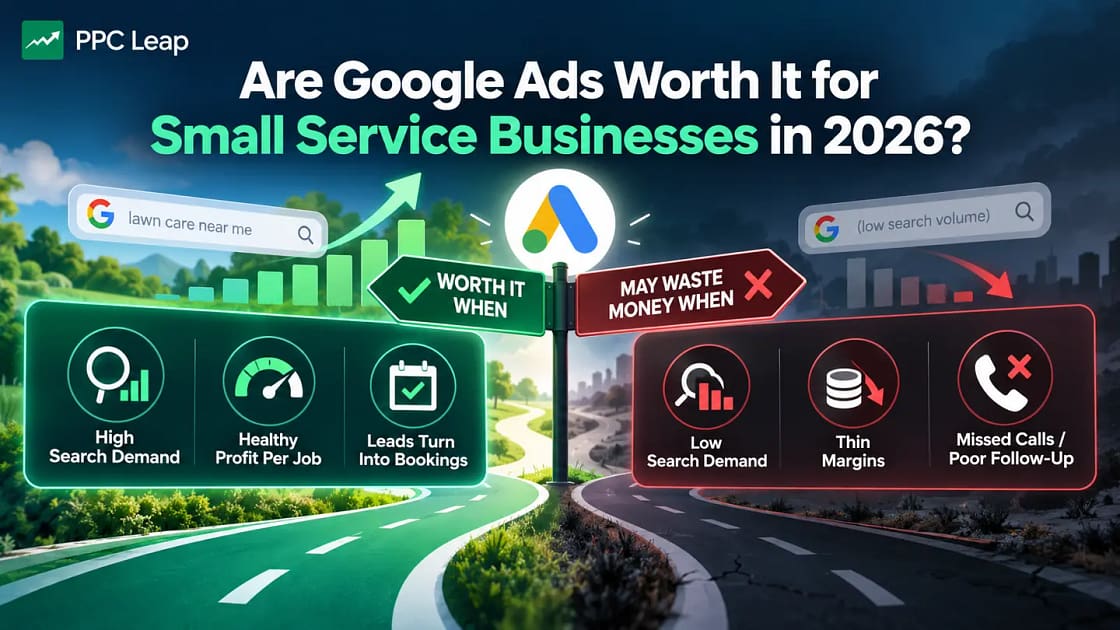
However, not every search leads to a booking. Customers may compare several providers, and some may only want prices.
Advertise Within Your Service Area
A local business usually serves a limited number of cities, towns, or suburbs.
Google Ads allows advertisers to select locations and exclude areas outside their coverage.
For example, a moving company serving only certain parts of Chicago can focus its campaigns on those areas.
This can help reduce irrelevant traffic from places the business cannot serve.
Control When and How Much You Spend
Google Ads allows businesses to set campaign budgets and change them when needed.
You can also schedule advertisements and pause campaigns.
This is useful when your business has limited staff, seasonal demand, or a specific number of available appointments.
For example, a pressure washing company may want more inquiries during its busiest season.
Advertising can help support that goal, provided enough customers are searching for the service.
Which Google Ads Campaign Type Is Best for Small Businesses?
Google offers several advertising campaign types.
Each serves a different purpose, so choosing the right option is important before spending money.
For most local service businesses new to paid advertising, a focused Search campaign is a sensible starting point.
Here is how the main options compare.
| Campaign Type | How It Works | Best Use |
| Search Ads | Show ads for relevant searches on Google | Calls, quote requests, and service bookings |
| Local Services Ads | Connect eligible businesses with local customers through a pay-per-lead model | Eligible home and professional services |
| Performance Max | Uses automation to advertise across multiple Google channels | Businesses with suitable goals, assets, and reliable tracking |
| Display Ads | Show visual advertisements across websites and apps | Awareness and suitable remarketing campaigns |
| Video Ads | Show video advertisements on YouTube and eligible placements | Service demonstrations and brand awareness |
Google Search Ads
Search Ads allow businesses to target searches related to the services they offer.
For example, a roofing company may advertise for searches such as “roof repair in Austin” or “roof replacement contractor.”
The business can organise its keywords, write relevant advertisements, and choose which website pages visitors see.
This makes Search Ads useful when customers already know what service they want.
A beginner can start with one Search campaign and expand after learning which searches generate useful inquiries.
Google Local Services Ads
Local Services Ads, also known as LSAs, are designed for eligible service providers.
They help connect local customers with businesses offering relevant services.
Unlike standard Search Ads, where advertisers generally pay for clicks, Local Services advertising uses a pay-per-lead model.
Availability depends on the country, service category, and Google’s eligibility requirements.
Important 2026 update: Google began moving eligible US Local Services Ads advertisers to specialised Performance Max campaigns with pay-per-lead goals in August 2026.
The rollout continues in phases. Other eligible accounts and countries have different migration schedules.
This specialised Performance Max format keeps the pay-per-lead model and is different from a standard Performance Max campaign.
Standard Performance Max Campaigns
Performance Max uses Google’s automation to run advertisements across channels such as Search, YouTube, Display, Gmail, and Maps.
It can be useful when a business has reliable conversion tracking and wants to reach customers across more than one channel.
However, it is not automatically better than a Search campaign.
A small business running its first local lead-generation campaign may find it easier to understand results when starting with a focused Search setup.
Once the business has reliable data, it can evaluate whether broader campaign types make sense.
What Do You Need Before Starting Google Ads?
Before creating your first campaign, prepare the basic information and tools needed to run it properly.
A few early decisions can prevent problems later.
A Google Ads Account You Control
Create your Google Ads account using a Google account controlled by your business.
Use accurate business and billing information.
Make sure the correct billing country, currency, and time zone are selected during setup. Some account settings cannot be changed later without creating another account.
If you hire an agency, grant the appropriate account access rather than handing over your personal login details.
Your business should retain administrative control of its advertising account and access to its performance history.
A Website or Suitable Service Landing Page
For a typical Search campaign, you need a page where people can learn about your service and contact you.
This might be a dedicated landing page or a relevant service page on your website.
For example, someone clicking an advertisement for carpet cleaning should arrive on a page that explains carpet cleaning.
Sending every visitor to a general homepage may make it harder for them to find the service they searched for.
Your page should work properly on mobile devices and make contacting the business easy.
A Clear Advertising Goal
Choose what you want customers to do after seeing your advertisement.
For most local service businesses, the goal is not simply getting website visitors.
It may be receiving phone calls, quote requests, contact forms, or appointment bookings.
For example, a pest control company may want inquiries from customers needing a treatment.
An accounting firm may want potential clients to book consultations.
Your goal will guide how the campaign is built and measured.
Conversion Tracking
Conversion tracking helps you measure what people do after interacting with your advertisements.
For example, it can record when someone submits a contact form or completes another tracked action.
Phone call tracking may also be available depending on the setup.
A website click and a customer inquiry are not the same thing.
Tracking helps you understand which advertisements generate meaningful actions rather than only visitors.
Test your tracking before launching the campaign to make sure the correct actions are recorded.
Google Business Profile
A Google Business Profile helps eligible businesses manage how their information appears in Google Search and Maps.
If your business has a profile, make sure its details are accurate.
Depending on the advertising setup, you may be able to connect your Business Profile with Google Ads to use relevant location information.
A Google Business Profile is not required for every standard Search campaign.
However, it is an important part of local visibility and is required for certain Local Services advertising setups.
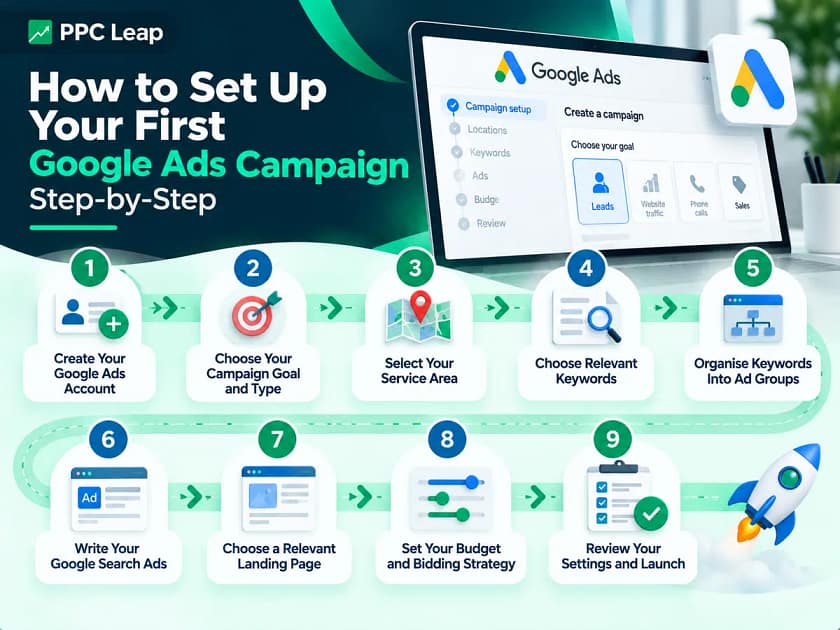
How to Set Up Your First Google Ads Campaign – Step-by-Step
Google Ads provides a guided campaign creation process.
The screens may look different depending on your account, campaign goal, and available features.
The following steps explain the main decisions a local service business needs to make.
Step 1: Create Your Google Ads Account
Start by registering your business with Google Ads.
Enter the required business information and confirm the billing details.
Google may offer campaign recommendations while you create the account.
You do not need to accept every suggested setting.
Take time to review the available options before publishing anything.
If your business works with an advertising agency, keep the account under business-controlled access and provide the agency with suitable permissions.
This helps you retain access to the account if you change service providers.
Step 2: Choose Your Campaign Goal and Type
For a local business looking for customer inquiries, the Leads objective is often appropriate.
Next, select the campaign type.
For this example, choose Search.
Google may ask you to confirm which conversion actions should be used for campaign optimisation.
Select actions that reflect meaningful customer interest, such as genuine quote requests or suitable phone calls.
Avoid treating ordinary page views as paying customers.
Step 3: Select Your Service Area
Choose the locations where your business can provide its services.
For example, a cleaning company serving Dallas and nearby suburbs should avoid targeting the entire United States.
You can target supported cities, regions, postal codes, or radius areas.
Google also offers advanced location options.
The default setting can reach people who are in, regularly in, or interested in your selected locations.
For a business that only serves customers within a specific area, review whether the narrower Presence option is more suitable.
Location targeting is based on signals and cannot guarantee perfect accuracy, so review the results after launching.
Step 4: Choose Relevant Keywords
Keywords help Google understand which searches are relevant to your advertisements.
Think about the words customers use when they want to hire your business.
For example, a pest control company may begin with:
| Keyword Example | Search Intent |
| pest control Dallas | Looking for a local provider |
| termite treatment Dallas | Looking for a specific treatment |
| exterminator near me | Looking for nearby help |
| rodent removal service | Looking for a specific service |
| pest control jobs | Usually looking for employment |
The final example is generally not useful for a business advertising pest removal services.
Google Keyword Planner can help you research related searches, local demand, and estimated advertising costs.
Focus on keywords connected with services you actually provide.
Understand Keyword Match Types
Google Ads offers three main keyword match types.
Broad match can show advertisements for a wider range of related searches.
Phrase match can match searches that include the meaning of your selected keyword.
Exact match gives tighter control by matching searches with the same meaning or intent.
Exact match does not mean that Google will only show your ad when someone types precisely the same words.
For a small initial campaign, phrase and exact match can provide a more controlled starting point.
Broader matching can be tested later when conversion tracking works and the business can monitor search quality.
Add Negative Keywords
Negative keywords help prevent advertisements from appearing for unwanted searches.
For example, a pest control company that is not hiring may want to exclude searches about pest control jobs or training.
This helps avoid paying for clicks from people who are not potential customers.
Do not add negative keywords blindly.
Review whether a word is actually irrelevant before excluding it, because overly broad exclusions can also block useful searches.
Step 5: Organise Keywords Into Ad Groups
An ad group contains related keywords and advertisements.
Keep each group focused on a clear service or customer need.
For example, a pest control company could organise its first campaign like this:
| Campaign | Ad Group | Main Search Theme |
| Pest Control — Dallas | General Pest Control | Local pest control services |
| Pest Control — Dallas | Termite Treatment | Termite inspection and treatment |
| Pest Control — Dallas | Rodent Removal | Rat and mouse removal |
Each ad group can have advertisements that match the service.
This helps the business provide clearer information to people searching for different treatments.
A small business does not need dozens of ad groups at the beginning.
Start with the most relevant services and expand when useful.
Step 6: Write Your Google Search Ads
Google uses responsive search ads, which allow advertisers to provide several headlines and descriptions.
The platform can test different combinations to find suitable messages for searches.
Your advertisement should explain the service and tell potential customers what to do next.
For example:
Example Ad Headlines
Pest Control in Dallas
Local Pest Removal Services
Request a Pest Control Quote
Example Description
Need help with pests at your property? Contact our Dallas team to discuss treatment options and request a quote.
This example is written for an imaginary pest control business.
The advertisement clearly states the service, location, and next step.
Only include claims such as 24/7 service, guaranteed results, or same-day availability when your business can genuinely support them.
Use Relevant Ad Assets
Google Ads also offers assets that can provide extra information alongside your advertisements.
Useful options for local service businesses include call assets, sitelinks, callouts, location assets, and lead forms.
For example, a call asset can make it easier for a customer to contact your business.
A sitelink might direct visitors to your services or contact page.
Not every asset will appear with every ad, but suitable assets can make your advertisement more useful.
Step 7: Choose a Relevant Landing Page
The landing page should match what the customer searched for and what your advertisement promises.
For example, if someone searches for termite treatment, they should reach a page about termite treatment.
A useful service landing page normally includes the service name, a clear explanation, relevant trust information, service-area details, and a simple way to contact the business.
Make sure the page loads reliably and the contact form works.
For local businesses, mobile usability matters because customers may be searching while away from a computer.
Before launching, test the page yourself.
Submit the form, check the phone number, and confirm that the correct information reaches your business.
Step 8: Set Your Budget and Bidding Strategy
Google Ads allows you to set an average daily budget.
This helps control campaign spending over time.
There is no universal minimum advertising budget, but the amount should be enough to gather useful information.
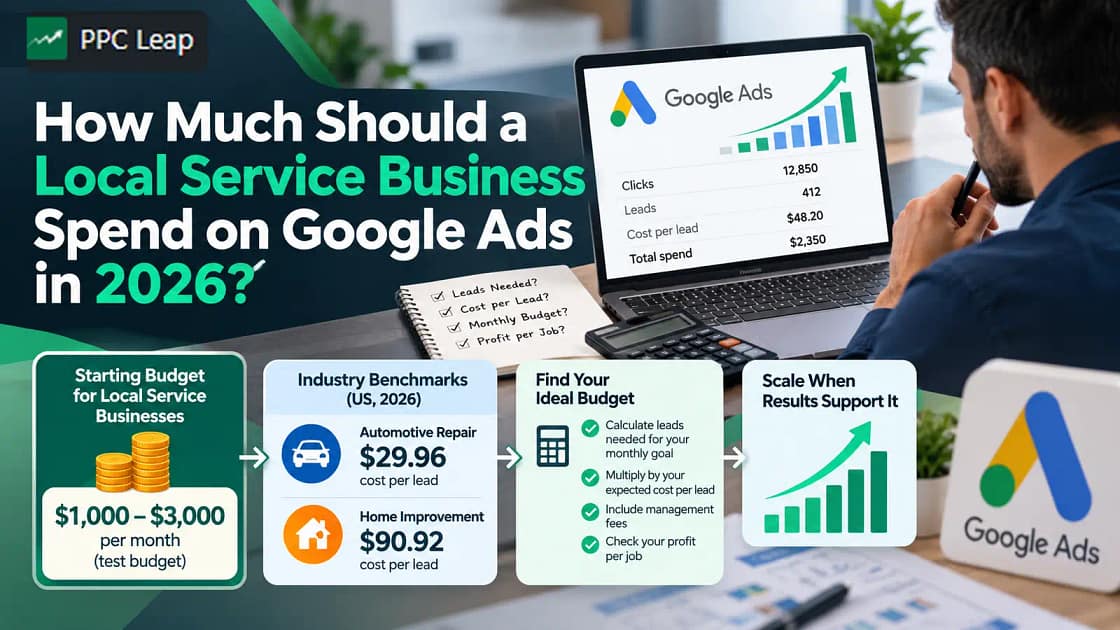
For example, if you plan to spend approximately $1,000 per month, the average daily budget would be about $32.89.
Google may spend more than that on some days and less on others.
For most campaigns with an unchanged budget, the normal monthly spending limit is 30.4 times the average daily budget.
You will also need to choose a bidding strategy.
For a new campaign, Maximize Clicks can be considered when you need initial traffic data. However, it seeks clicks rather than qualified leads.
Maximize Conversions can be useful when you have accurate conversion tracking and want the bidding system to focus on conversion actions.
The best choice depends on your goal, available data, and campaign setup.
Step 9: Review Your Settings and Launch
Before publishing, review the full campaign.
Check that your locations, keywords, negative keywords, ads, landing pages, conversion goals, and budget are correct.
Also review the Search Partners, Display Network, and other optional settings.
For a tightly focused Search campaign, make a deliberate choice about whether extra network reach is suitable.
Google may also show an AI Max option when creating a Search campaign.
In 2026, AI Max is enabled by default for new Search campaigns.
AI Max is an optimisation layer, not a separate campaign type.
It can expand matching and use other automated features. Review its settings and decide whether to keep them enabled based on your campaign goals and tracking readiness.
Once everything is ready, submit your campaign.
Google will review the advertisements before they can run.
Approval and the first appearance of your ads can take time, so do not assume the campaign will generate inquiries immediately.
How Much Does Google Ads Cost for a Small Business?
Google Ads does not have one fixed price for small businesses.
Costs depend on your industry, location, competition, keywords, and campaign performance.
For standard Search Ads, one important number is cost per click (CPC).
This tells you how much you pay, on average, when someone clicks your advertisement.
Another important number is cost per lead (CPL).
This tells you how much advertising money you spend to generate a tracked customer inquiry.
For example, imagine a small cleaning company runs a Google Search campaign with the following results:
| Campaign Metric | Example Result |
| Monthly ad spend | $1,000 |
| Average cost per click | $5 |
| Total clicks | 200 |
| Customer inquiries | 20 |
| Cost per lead | $50 |
The company spends $1,000 and receives 20 inquiries.
Its cost per lead is:
$1,000 ÷ 20 = $50
These are illustrative figures, not guaranteed results or industry averages.
The business should then check how many of those inquiries became paying customers.
A campaign with fewer but more valuable leads may be more useful than one generating many unsuitable inquiries.
When deciding how much to spend, include any management, landing-page, or tracking expenses in your overall marketing budget.
How Do You Know If Your Google Ads Campaign Is Working?
Once your campaign starts running, Google Ads provides reports that show advertising activity.
However, not every number tells you whether your business is gaining customers.
The most useful approach is to connect advertising results with actual customer inquiries and bookings.
Google Ads Metrics Every Beginner Should Know
| Metric | What It Means | Why It Matters |
| Impressions | Number of times your ad was shown | Shows how often your advertisement appears |
| Clicks | Number of recorded ad clicks | Shows how often people interact with your ad |
| Click-through rate (CTR) | Percentage of impressions that produce clicks | Helps assess ad engagement |
| Cost per click (CPC) | Average advertising cost per click | Helps monitor traffic costs |
| Conversions | Tracked customer actions | Shows which actions occur after ad interactions |
| Cost per lead (CPL) | Advertising spend divided by recorded leads | Helps measure inquiry costs |
| Cost per booked customer | Acquisition cost divided by actual customers | Helps evaluate business results |
For local service companies, the final number is especially useful.
A campaign may generate 30 inquiries, but if only three become paying customers, the business needs to understand the cost of those three bookings.
That information helps guide future advertising decisions.
Track What Happens After a Customer Contacts You
Google Ads can help you measure incoming inquiries, but your business also needs to understand what happens next.
For example, a person may submit a form, receive a quote, and book a service several days later.
A simple customer relationship management system, or CRM, can help track that process.
You can record where the inquiry came from, whether it was qualified, whether someone followed up, and whether the customer booked.
This is especially important for businesses with longer sales processes, such as roofing companies and commercial cleaning providers.
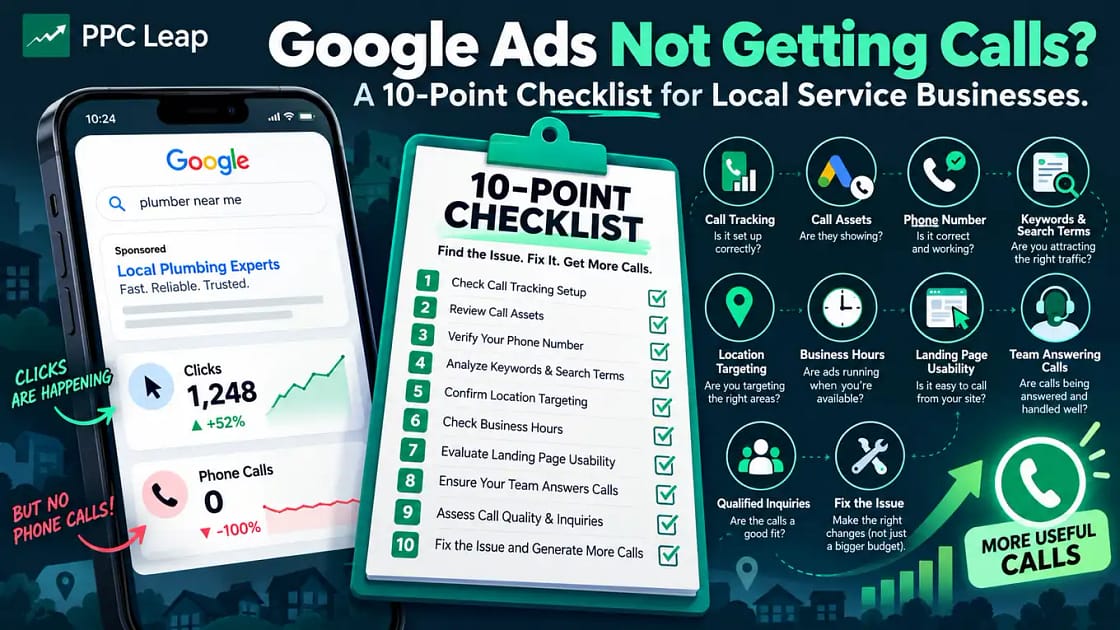
If your team does not respond to inquiries, even a well-targeted advertising campaign may struggle to generate paying customers.
What Should You Do During the First 30 Days of Google Ads?
Launching the campaign is not the end of the work.
The first month is an opportunity to check whether the advertisements reach suitable customers and whether your tracking works.
Use a simple review schedule rather than making changes without understanding the results.
| Period | What to Review | Recommended Action |
| Days 1–3 | Ad approval, tracking, landing pages, phone numbers | Fix setup problems and test inquiries |
| Days 4–7 | Search terms, locations, unwanted clicks | Review irrelevant searches and add suitable negatives |
| Week 2 | Keywords, ad relevance, CPC, customer inquiries | Identify which services attract useful interest |
| Week 3 | Landing-page performance and lead quality | Fix weak contact paths and review unsuitable inquiries |
| Week 4 | Cost per lead, booked jobs, total advertising costs | Decide what needs improving before spending more |
This is a suggested review schedule, not a fixed Google Ads learning period.
Some campaigns need more time to collect enough data, especially when search demand is low or customers take longer to make decisions.
Avoid changing campaign settings simply because one day has fewer clicks than another.
Look for useful patterns and make changes based on evidence.

7 Google Ads Tips for Small Service Businesses
Beginners often focus on getting their first campaign live.
However, a few simple habits can help improve campaign quality and protect advertising budgets.
1. Start With One Main Service
Do not advertise every service immediately.
Choose a service with clear customer demand and enough profit to support advertising.
Once you understand the results, consider expanding.
2. Check Your Search Terms Regularly
The search terms report helps show many of the searches that triggered your advertisements.
Review it for searches that do not fit your business.
Use suitable negative keywords to reduce unwanted traffic.
3. Keep Ads and Landing Pages Relevant
Someone searching for a specific repair should not have to search your website again to find that service.
Match your advertisement with a page that answers the customer’s needs.
4. Do Not Accept Every Automated Recommendation
Google Ads may recommend changes to keywords, bidding, budgets, and other settings.
Some recommendations may be useful.
Others may not suit your business goals.
Review the expected effect before applying changes.
5. Make Sure Someone Answers Customer Calls
A paid click may become a customer inquiry.
If nobody responds, the potential booking may be lost.
Make call handling and follow-up part of your advertising plan.
6. Measure Actual Customers
Do not judge success using impressions or clicks alone.
Track qualified inquiries, quotes, appointments, and completed bookings.
Use these results to understand which campaigns attract valuable work.
7. Improve Before Increasing Your Budget
If a campaign attracts irrelevant searches or poor-quality leads, adding more money may increase the problem.
Find what is not working first.
Once your campaign generates suitable inquiries at an affordable cost, consider testing a larger budget.
Common Google Ads Mistakes Small Businesses Should Avoid
Even a carefully planned campaign can underperform when important settings are overlooked.
These are some of the most common beginner mistakes.
| Mistake | Why It Creates Problems | Better Approach |
| Targeting too many locations | Ads may reach customers outside your service area | Focus on locations you can serve |
| Using unrelated keywords | Visitors may not need your services | Select service-related, high-intent searches |
| Ignoring negative keywords | Irrelevant searches may consume your budget | Review search terms and add suitable exclusions |
| Sending every ad to the homepage | Visitors may struggle to find the advertised service | Use relevant service or landing pages |
| Not tracking customer inquiries | You cannot tell which ads produce useful actions | Set up and test conversion tracking |
| Making frequent changes without enough data | Results become harder to evaluate | Review meaningful performance periods |
| Giving an agency full control without appropriate access rights | Your business may lose easy access to its advertising data | Keep business-controlled administrative access |
The biggest lesson is that Google Ads requires ongoing attention.
A campaign should be reviewed and improved using actual customer results.
Real Google Ads Example – PPC Leap’s UK Cleaning Business Campaign
A practical example can help show how the different parts of a Google Ads campaign work together.
PPC Leap has published a case study involving a local cleaning business in the United Kingdom.
The business was starting Google Ads without previous campaign history.
The goal was to generate relevant customer inquiries across several cleaning services.
How the Campaign Was Structured
PPC Leap organised the campaign around service-related searches, including deep cleaning, carpet cleaning, and other cleaning services.
Rather than dividing the available budget across many separate campaigns immediately, the setup grouped relevant services within a controlled campaign structure.
The landing page focused on helping customers make contact.
Different inquiry channels were also tracked, including phone calls, WhatsApp, and website forms.
Reported Results
| Campaign Metric | Reported Result |
| Total tracked conversions | 63 |
| Reported cost per conversion | £22.16 |
| Phone call conversions | 23 |
| WhatsApp conversions | 31 |
| Website form conversions | 9 |
| Reported conversion rate | 3.80% |
Source: PPC Leap’s UK Cleaning Business Case Study
These results come from one reported campaign.
The 63 tracked conversions include different contact actions. They should not be treated as 63 independently verified paying customers.
The published case study also reports a client closing rate, but the available figures do not establish the campaign’s final net profit.
The example shows why campaign structure, service-related searches, landing-page design, and conversion tracking should work together.
For a beginner, these foundations matter more than launching several complicated campaigns immediately.
Should You Manage Google Ads Yourself or Hire an Agency?
Small businesses can create and manage their own Google Ads campaigns.
Google provides tools for account setup, keyword research, advertising, and performance reporting.
However, managing campaigns takes time.
You need to understand targeting, tracking, budgets, and how to review results.
If you have the time to learn and regularly check your campaigns, managing a focused Search campaign yourself may be practical.
Hiring an agency may be useful when your business needs more advanced tracking, multiple service campaigns, or ongoing optimisation.
Before choosing an agency, ask how it handles account access, reporting, campaign changes, and advertising costs.
You should understand what is included in the management fee and what you pay directly to Google.
PPC Leap offers Google Ads management for local service businesses with a focus on relevant searches, lead tracking, landing pages, and improving campaign performance.
Whether you manage Google Ads yourself or hire support, your business should have clear access to its account and understand how success is measured.

Frequently Asked Questions
1. Can I Run Google Ads for My Small Business Without a Website?
Some Google advertising formats allow customer contact through phone calls or lead forms without a traditional website. However, a relevant service page is usually helpful for Search campaigns because customers can review your services before contacting you.
2. Can I Run Google Ads Myself Without Hiring an Agency?
Yes. Small business owners can create and manage their own Google Ads accounts. Start with a focused campaign, learn the basic settings, check performance regularly, and seek specialist help if tracking or campaign management becomes difficult.
3. How Long Does It Take for Google Ads to Start Showing Results?
Eligible ads can begin appearing after Google’s review process, but customer inquiries are not guaranteed. The time needed to assess results depends on search demand, budget, competition, conversion tracking, and how quickly customers make booking decisions.
4. Does Running Google Ads Improve My Organic Google Rankings?
No. Paying for Google Ads does not directly improve your website’s organic search rankings. Paid advertisements and unpaid search results use different systems. Businesses can use Google Ads and SEO together to reach customers through both channels.
5. What Happens If I Pause My Google Ads Campaign?
Pausing a campaign stops it from serving new advertisements while paused. Your existing account and historical performance data remain available. You can normally resume the campaign later, although future costs and results may differ.
Google Ads for Small Business: Final Beginner’s Checklist
Google Ads can help local service businesses reach people who are already searching for their services.
But a successful campaign requires more than choosing keywords and setting a daily budget.
Start with a business-owned account, one clear advertising goal, and a focused Search campaign.
Target locations you can serve, choose relevant keywords, and write advertisements that match what customers need.
Make sure your landing page works properly and that your business can respond to inquiries.
Set up conversion tracking before spending money, then regularly review search terms, lead quality, and customer bookings.
The best first Google Ads campaign isz’h the most complicated. It is one you can understand, measure, and improve.
If you want help planning or managing Google Ads, PPC Leap works with local service businesses to connect relevant search traffic with customer inquiries and bookings.
Book a free growth call to discuss your advertising goals, service area, and current setup.