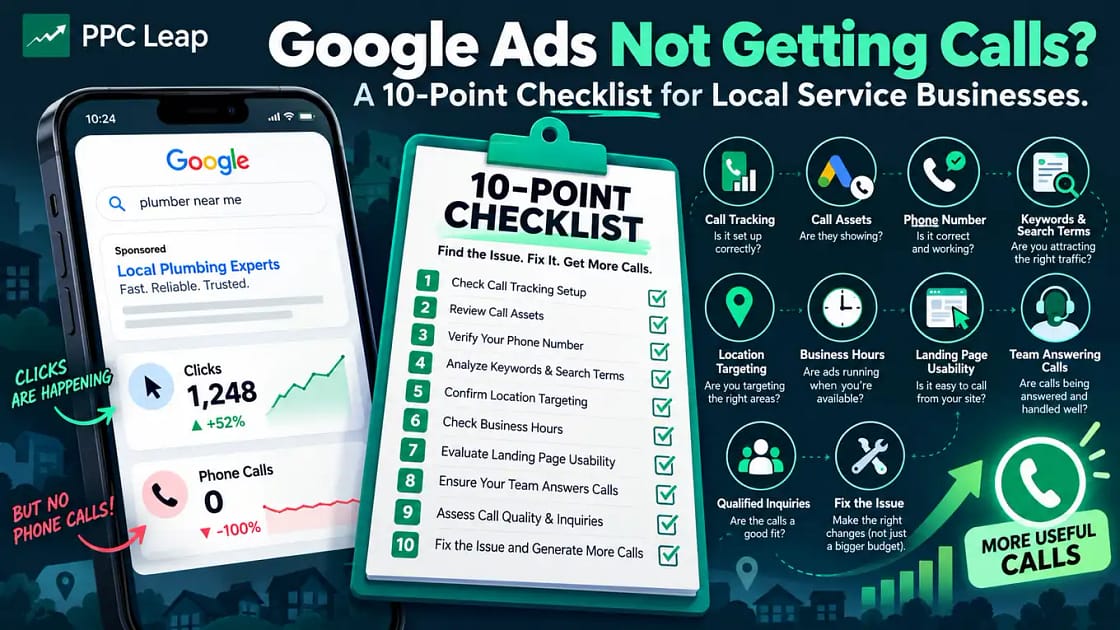
If your Google Ads are getting clicks but no phone calls, the problem could be incorrect call tracking, irrelevant keywords, poor location targeting, or a landing page that makes contacting you difficult. Start by checking whether calls are actually missing or simply not appearing in your Google Ads reports. Then review your call assets, phone number, search terms, business hours, and landing page. Make sure your team answers incoming calls and tracks qualified inquiries. This 10-point checklist will help you find what’s wrong, fix it, and generate more useful calls without immediately increasing your advertising budget.
Why Are Your Google Ads Getting Clicks but No Calls?
Getting clicks from Google Ads means people are interacting with your advertisements. It does not mean those visitors are ready to hire your business.
For example, a pest control company may get clicks from people looking for pest control jobs, DIY treatments, or services outside its coverage area.
Those visitors may never call because they were not looking to hire a local pest control company.
Other businesses attract relevant visitors but lose them because their website is confusing, their phone number is difficult to find, or nobody answers incoming calls.
Sometimes the calls are happening, but Google Ads is not recording them correctly.
This is why effective Google Ads management for local businesses involves reviewing search intent, tracking, landing pages, and lead quality rather than focusing only on clicks.
Before changing your campaign, identify which problem applies to your business.
Find Out Where You’re Losing Potential Customers
| What You Notice | Possible Cause | What to Check |
| Ads receive no impressions | Campaign delivery problem | Approval status, targeting and budget |
| Ads get clicks but no calls | Irrelevant searches or poor landing page | Search terms and website |
| Customers call but Google Ads shows zero calls | Incomplete call tracking | Conversion actions and call reporting |
| Call button doesn’t appear | Call asset issue | Asset approval and settings |
| Calls come from outside your service area | Broad location targeting | Geographic settings |
| Calls arrive when your business is closed | Incorrect ad schedule | Business hours and call routing |
| Many calls but few bookings | Poor lead quality or follow-up | Call records and sales process |
Start with the issue that matches your campaign.
A business getting no impressions needs a different solution than one getting hundreds of clicks but no genuine customer inquiries.
The following checks explain how to investigate each part of the process.
Check Whether Your Google Ads Call Tracking Is Working
Before changing keywords or increasing your budget, confirm that phone calls are being measured correctly.
Google Ads can track calls that come directly from advertisements and calls made after someone visits your website.
However, each requires a different tracking setup.
If your conversion tracking is incomplete, Google Ads may report no phone calls even when customers have contacted your business.
Understand the Different Types of Call Tracking
| Tracking Type | What It Measures |
| Calls from ads | Calls made through eligible advertisements or call assets |
| Calls from website visits | Calls made to a tracked phone number after an ad click |
| Phone number clicks | Clicks on a phone link or button, not confirmed conversations |
| Imported call conversions | Valuable call outcomes recorded through a connected system |
The difference is important.
Someone tapping your phone number does not guarantee that a conversation took place.
They might close the dialer before calling or end the call before anyone answers.
How to Check Your Call Tracking
Open your Google Ads account and review the phone call conversion actions under Goals → Conversions.
Check whether the relevant call conversion actions are active and configured correctly.
Then review your call reporting settings and available call details.
Google’s call reporting can use forwarding numbers to measure eligible calls from advertisements.
These reports may include call duration, call time, and connection status.
Call reporting availability depends on the country and the account’s eligibility.
If you also want to measure calls made from your website, you may need a separate website call conversion setup with the appropriate Google tag and phone-number tracking.
Quick fix: Compare your Google Ads call reports with your actual business phone records for the same dates.
If the phone records show calls that Google Ads does not, investigate the tracking setup before assuming the campaign is failing.
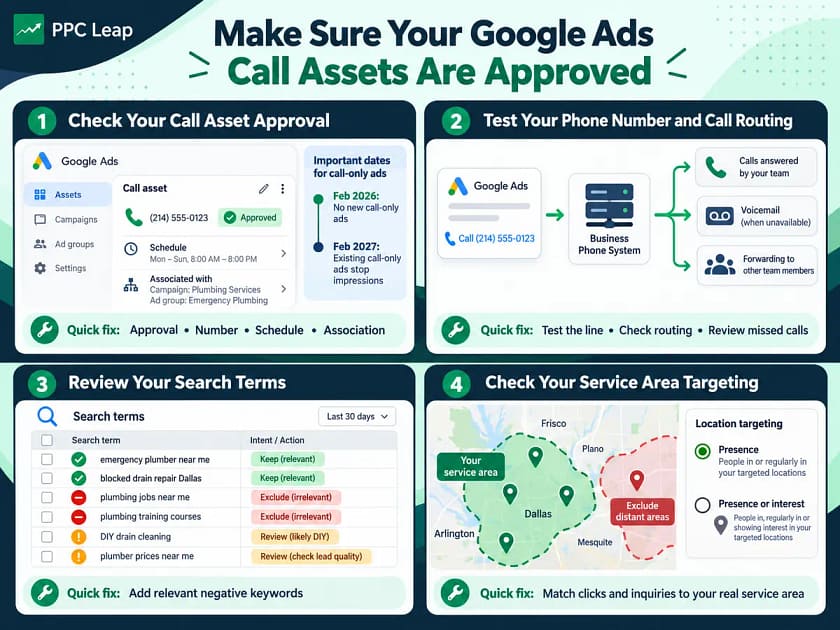
Make Sure Your Google Ads Call Assets Are Approved
Call assets allow customers to contact your business directly from eligible Google Search advertisements.
For local service companies, they can make it easier for people to call without visiting the website first.
For example, someone searching for an emergency plumber may prefer calling immediately rather than filling out a contact form.
However, adding a phone number does not mean it will appear with every advertisement.
Google determines when eligible call assets can show.
How to Check Your Call Assets
Open Campaigns → Assets in Google Ads and review your call assets.
Check that the phone number is correct, the asset is approved, and it is attached to the intended account, campaign, or ad group.
Also review any schedule applied to the asset.
A call asset may be eligible but unavailable during certain hours because of its schedule.
If Google has disapproved the asset, review the reason and fix any phone-number verification or policy issues.
Your business number should also be connected with your business and meet Google’s requirements.
Important Google Ads Update for 2026
Google is replacing the older call-only ad format with responsive search ads that use call assets.
The transition includes two important dates.
February 2026: Google removed options for creating new call-only ads.
February 2027: Existing call-only ads are scheduled to stop receiving impressions.
If your business still relies on older call-only advertisements, review them and prepare suitable responsive search ads with call assets.
Quick fix: Check your call asset approval, phone number, schedule, and campaign association before changing your advertising strategy.
Test Your Business Phone Number and Call Routing
Your Google Ads campaign may be attracting customers, but a phone system problem could prevent those calls from reaching your business.
For example, your advertisement might use a call-tracking setup that forwards calls to an old number.
Your phone might also have an incorrect forwarding rule, a full voicemail box, or an unavailable staff member.
These issues can make a working advertising campaign appear unsuccessful.
What Should You Test?
Start by calling your normal business number from another phone.
Check whether the call connects and reaches the correct person or department.
If your business uses a separate call tracking provider, review its routing settings as well.
Make sure incoming calls are not being sent to an inactive number or an unavailable team member.
Also check your voicemail and missed-call notifications.
If you use Google forwarding numbers, follow Google’s supported reporting and testing procedures. Do not copy temporary Google forwarding numbers onto your website or marketing materials.
Check Whether Calls Are Being Answered
A connected call is not necessarily a useful customer conversation.
If the phone rings but nobody answers, the customer may contact another business.
Review missed calls and find out whether they received a callback.
For emergency services, even a short delay may cause the customer to choose another provider.
Quick fix: Test the phone system, review call routing, and make sure someone is responsible for responding to missed calls.
Review the Search Terms Bringing Visitors to Your Ads
One of the most common reasons Google Ads generate clicks but no calls is poor search intent.
Your advertisements may appear for searches related to your industry but unrelated to the services you sell.
For example, a roofing company may attract people searching for roofing jobs, training courses, or DIY repair instructions.
These visitors are not necessarily looking to hire a roofing contractor.
Check Your Google Ads Search Terms Report
The Search terms report shows many of the searches that caused your advertisements to appear.
Review the available data and identify searches that do not match your business.
For example:
| Search Term | Likely Customer Intent | Action to Consider |
| emergency plumber near me | Needs plumbing help | Keep targeting |
| blocked drain repair Dallas | Looking for a local service | Keep targeting |
| plumbing jobs near me | Looking for employment | Consider excluding |
| plumbing training courses | Looking for education | Consider excluding |
| DIY drain cleaning | Looking for instructions | Review for exclusion |
| plumber prices near me | Comparing service costs | Review lead quality |
Not every search containing your main keyword is a potential customer.
However, searches about prices or quotes can still be valuable because some customers compare costs before booking.
Add Relevant Negative Keywords
Negative keywords help prevent your advertisements from appearing for unsuitable searches.
For example, an electrician who does not offer training could exclude relevant training-related terms.
A pest control business could review searches about pest control jobs, courses, or products it does not sell.
Avoid adding negative keywords without checking their meaning.
Overly broad exclusions can block useful searches.
Google also does not show every individual search query in the report, so use the available information to identify patterns.
Quick fix: Remove clearly irrelevant search intent from your targeting before paying for more traffic.
Check Whether Your Ads Reach the Right Service Areas
Local service businesses need inquiries from people they can actually serve.
A towing company operating in Dallas may have little use for calls from customers several hours away.
A cleaning company serving selected suburbs may not want inquiries from another city.
Incorrect location targeting can waste advertising money and create calls that never become bookings.
Review Your Google Ads Location Settings
Google Ads offers different geographic targeting options.
The two main options to understand are:
Presence or Interest: Can reach people who are in, regularly in, or have shown interest in your selected locations.
Presence: Focuses on people likely to be in or regularly in the locations you target.
The default Presence or Interest setting provides broader reach.
However, a local service business may prefer Presence targeting when it only wants to serve customers physically located in its service area.
For example, a mobile tyre fitting company may want to focus on people who need help within its operating region.
When Broader Location Targeting Might Help
Narrower location targeting is not always better.
Imagine a landlord living in another city who needs commercial cleaning at a property within your service area.
That person might search for a cleaning company in the property’s city while living elsewhere.
A broader location setting could help reach them.
Choose the option based on how your customers actually search.
Google’s location targeting uses several signals and is not perfectly accurate.
Review geographic performance reports and exclude areas your business cannot serve.
Quick fix: Compare the locations generating clicks and inquiries with your actual service area.
Make Sure Your Ads Run When Customers Can Reach You
Advertising schedules can affect whether customer inquiries become real conversations.
For example, a plumbing company may advertise emergency repairs throughout the night.
But if nobody answers after 6 p.m., potential customers may call another provider.
The advertisements may generate interest, but the business cannot respond.
This is especially important for services where customers need immediate help.
Match Your Call Schedule With Your Business Hours
Review your campaign ad schedule and any schedules applied to your call assets.
Also check the time zone used by your Google Ads account.
Consider the following situations:
| Business Type | Call Availability | Suggested Approach |
| Office cleaning company | 9 a.m.–5 p.m. | Schedule calls during staffed hours and offer a quote form |
| Emergency towing company | Genuine 24/7 coverage | Keep call access available around the clock |
| Roofing contractor | Limited office staff | Arrange call handling or a callback process |
| Pest control company | Daytime bookings | Match call scheduling with actual availability |
These are examples. Your schedule should reflect your own staffing and customer demand.
If you cannot answer calls outside business hours, a working contact form can still allow customers to request a callback.
You can also consider an appropriate answering service.
However, only advertise 24/7 availability if your business genuinely provides it.
Quick fix: Review when calls arrive, when they go unanswered, and whether your advertising schedule matches your available staff.
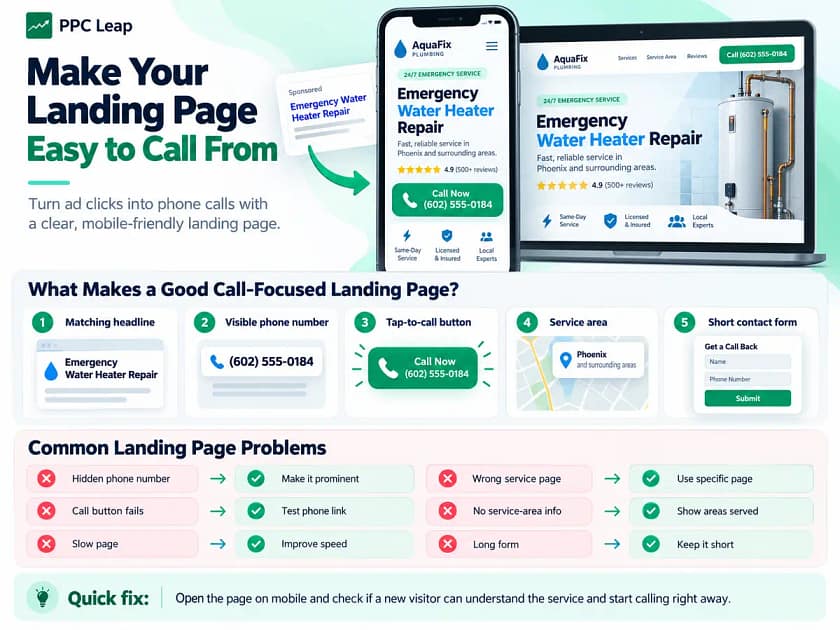
Make Your Landing Page Easy to Call From
If your ads attract suitable visitors but your phone remains quiet, check what happens after someone clicks.
A landing page should help people quickly understand the service and contact your business.
Imagine someone searching for emergency water heater repair.
They click an advertisement but arrive on a general plumbing homepage.
The page discusses several plumbing services, and the phone number is difficult to find.
Even if the business provides water heater repair, the visitor may leave because the next step is unclear.
A more relevant page could explain the repair service, show the coverage area, and provide an easy way to call.
What Makes a Good Call-Focused Landing Page?
Start with a headline that matches the customer’s search.
Explain the service in simple language and include the locations where your business operates.
Make the phone number clearly visible.
On mobile devices, use a working tap-to-call link.
If someone cannot call immediately, a short contact form can provide another way to request service.
Genuine reviews, relevant business details, and clear service information can also help visitors decide whether to contact you.
Common Landing Page Problems
| Problem | Why It Matters | What to Improve |
| Phone number is hidden | Customers struggle to contact you | Place it in a prominent position |
| Call button does not work | Mobile visitors cannot easily call | Test the phone link |
| Page loads slowly | Visitors may leave early | Improve loading performance |
| Service does not match the ad | Visitors may think the business is irrelevant | Use a specific service page |
| No service-area information | Customers cannot confirm coverage | Clearly state areas served |
| Contact form is too long | Visitors may abandon the form | Ask only for necessary details |
Your website does not always need a complete redesign.
Sometimes a clearer headline, better mobile layout, or working call button can make the page easier to use.
For businesses receiving clicks but few inquiries, PPC Leap’s ads landing page design services focus on connecting search intent, service information, and clear contact options.
Quick fix: Open your landing page on a mobile phone and check whether a new visitor can understand the service and begin calling without searching through the page.
Check Your Conversion Goals and Bidding Strategy
Google Ads uses conversion data to measure valuable actions and guide automated bidding.
Problems can occur when your campaign tracks the wrong actions.
For example, suppose your account counts every visit to the contact page as a conversion.
Google Ads may show several conversions even though nobody called or submitted an inquiry.
If those actions are used for automated bidding, the campaign may optimise toward page visits rather than genuine leads.
Review Your Primary Conversion Actions
Open the Goals section in Google Ads.
Check the conversion actions used by your campaign and identify which are marked as primary.
Primary conversion actions can influence automated bidding when they are included in the campaign’s conversion goals.
For a phone-focused campaign, consider whether the main conversion actions represent meaningful calls, qualified inquiries, or booked appointments.
Different businesses may need different tracking arrangements.
Phone Clicks Are Not the Same as Phone Conversations
Suppose a visitor taps the phone number on your website.
A basic phone-click tracking setup may record that action.
But it does not confirm whether the customer completed the call.
Google Ads also supports call conversion measurement that can use minimum call duration, where supported.
For example:
| Call Duration | Conversion Threshold | Counted as a Duration-Based Conversion? |
| 20 seconds | 60 seconds | No |
| 75 seconds | 60 seconds | Yes |
| 3 minutes | 60 seconds | Yes |
The 60-second threshold is illustrative.
It is not a universal recommendation.
Some businesses can book customers in short calls. Others need longer conversations to confirm service requirements.
Where available, more advanced tracking can help identify qualified calls or import actual sales outcomes.
Does Your Bidding Strategy Match Your Goal?
If your campaign uses Maximize Clicks, Google focuses on generating clicks within your budget.
That does not mean it specifically tries to generate connected phone calls.
Maximize Conversions aims to generate more of the conversion actions selected for the campaign.
However, it depends on suitable conversion data.
Before changing bidding strategies, confirm that your tracking works and your conversion goals represent useful customer actions.
Quick fix: Make sure your campaign measures genuine business inquiries instead of treating every website interaction as a valuable lead.
Review Your Campaign Traffic, Networks and Budget
Some Google Ads campaigns receive few phone calls because they do not generate enough suitable traffic.
For example, a campaign targeting a small service area may receive only a limited number of relevant searches.
A low budget can also restrict how often the advertisements appear.
However, increasing spending is not always the right solution.
First, check whether the existing traffic is relevant.
Check Your Search Network Settings
Search campaigns can include eligible Google Search Partner traffic when that network is enabled.
Search partners may perform differently from Google Search itself.
Review your network settings and available performance reports.
If one traffic source generates many clicks but few useful inquiries, investigate the reason.
Do not assume that all search partner traffic is poor quality.
Your own campaign results should guide the decision.
Find Out Whether Your Budget Limits Reach
Look at your campaign’s available impression-share metrics and budget status.
These can help you understand whether budget limits or other factors restrict your visibility.
For example, a campaign may lose some eligible impressions because its budget is too low.
However, that does not mean increasing the budget will automatically produce more phone calls.
If the traffic is irrelevant or your landing page is not working, additional spend may create more of the same problems.
A budget increase makes more sense when you already receive suitable inquiries at an acceptable cost and have enough capacity for more customers.
Quick fix: Check traffic volume, network performance, and lead quality before deciding whether more advertising money is needed.
Find Out Whether Your Team Is Missing Customer Calls
Sometimes the Google Ads campaign is working, but the business is losing customers after they call.
This can happen when staff are busy, calls go unanswered, or nobody follows up.
For example, a roofing contractor may be working at a property when someone calls about a roof leak.
The call goes to voicemail.
The customer then contacts another roofing company and books the repair.
The advertisement created an opportunity, but the business lost the job.
Track the Full Journey From Call to Booking
Use your phone records or CRM to check what happens after each inquiry.
Record whether the call was answered, whether the customer needed a service you provide, and whether an appointment or quote followed.
A simple process could look like this:
| Lead Stage | What to Track |
| Incoming call | Date, time and source |
| Call response | Answered or missed |
| Lead qualification | Relevant or unsuitable |
| Next step | Quote, appointment or callback |
| Final outcome | Booked, declined or pending |
A business receiving 20 calls may appear successful.
But if 10 are missed, five are irrelevant, and only one becomes a paying customer, there is still work to do.
Improving call handling and follow-up may help you get more bookings from the inquiries you already receive.
If necessary, use an appropriate answering service or automated response system.
Any automated messages should follow applicable communication rules and customer preferences.
Quick fix: Review your missed calls and booking records before assuming you need more advertising traffic.
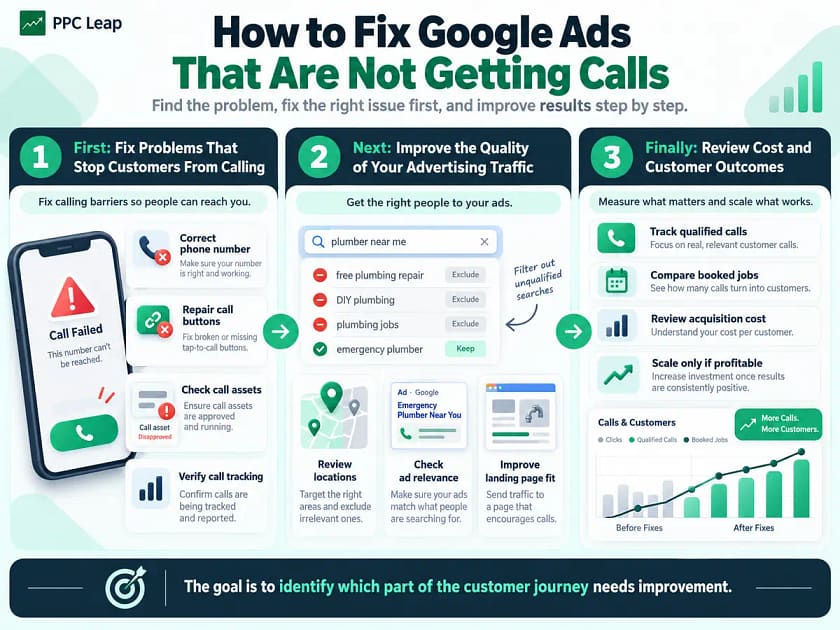
How to Fix Google Ads That Are Not Getting Calls
After checking the 10 areas above, you should have a clearer idea of where the problem occurs.
The next step is choosing what to fix first.
Avoid making several unrelated campaign changes at once unless they correct serious problems.
First: Fix Problems That Stop Customers From Calling
Start with issues that make contacting your business impossible or difficult.
These include incorrect phone numbers, broken call buttons, disapproved call assets, and faulty call routing.
Also check whether calls are happening but missing from your reports.
Fixing tracking helps you evaluate the results of later changes.
Next: Improve the Quality of Your Advertising Traffic
Once the phone system and tracking work, review search terms, location settings, campaign networks, and ad relevance.
Look for clicks from people who are unlikely to hire your business.
Use the available data to refine unsuitable searches and locations.
Then check whether the landing page gives relevant visitors a clear reason to contact you.
Finally: Review Cost and Customer Outcomes
After the important issues have been addressed, compare your results over a suitable period.
Look at qualified calls, booked jobs, and how much you spend to acquire each customer.
If the campaign generates profitable bookings, you can consider increasing the budget.
If results remain weak, continue investigating the specific problem rather than changing settings without a reason.
The goal is to understand which part of the customer journey needs improvement.
How PPC Leap Improved Call Relevance for a Canadian Business
A campaign can generate phone calls and still waste money if those calls come from the wrong people.
PPC Leap worked on a Google Ads campaign for a Canadian junk-car buying business.
The company wanted inquiries from people looking to sell unwanted vehicles.
However, the existing keyword targeting was also attracting people searching for junk-car parts, scrap metal, salvage yards, and vehicle repairs.
These searches were related to cars, but they did not match the service the company provided.
As a result, advertising money was being spent on inquiries the business could not use.
What PPC Leap Changed
PPC Leap rebuilt the keyword strategy around searches from people wanting to sell unwanted vehicles.
The team reviewed irrelevant search terms and developed a negative keyword list to reduce unwanted traffic.
The campaign also improved conversion tracking across phone calls, website forms, and WhatsApp interactions.
This helped provide a broader view of the inquiries generated by advertising.
Reported Campaign Results
According to PPC Leap’s Canadian junk-car buyer case study, the campaign reported the following results between January 18 and February 11, 2026:
| Campaign Metric | Reported Result |
| Total advertising spend | CA$2,807.65 |
| Recorded phone calls | 158 |
| Reported cost per call | CA$17.77 |
| Campaign type | Google Search |
| Market | Canada |
| Contact channels tracked | Calls, forms and WhatsApp |
These figures are from one reported campaign, not guaranteed results for other businesses.
The published case study does not establish the number of completed customer transactions or final net profit.
The key lesson is that the quality of phone calls matters as much as the number received.
A campaign needs to reach people who actually want the service being advertised.
Before spending more to generate additional calls, check whether your existing inquiries match the work your business wants.
How to Measure Whether Your Google Ads Calls Are Improving
After making changes, compare results using metrics that reflect customer interest and business outcomes.
Do not rely only on how often advertisements appear or how many clicks they receive.
The Most Useful Call Performance Metrics
| Metric | What It Tells You |
| Clicks | Number of recorded interactions with your ads |
| Recorded calls | Number of calls measured by your tracking setup |
| Connected calls | Calls that reached your business |
| Qualified calls | Calls from people needing suitable services |
| Cost per recorded call | Ad spend divided by tracked calls |
| Cost per qualified call | Ad spend divided by relevant inquiries |
| Cost per booked job | Ad spend divided by booked jobs |
| Missed-call rate | Percentage of incoming calls that went unanswered |
Example: Are Your Google Ads Calls Worth the Cost?
Imagine a plumbing company spends $1,200 on Google Ads during a month.
Its records show:
| Metric | Result |
| Google Ads spend | $1,200 |
| Recorded phone calls | 12 |
| Qualified calls | 8 |
| Booked jobs | 5 |
| Cost per recorded call | $100 |
| Cost per qualified call | $150 |
| Advertising cost per booked job | $240 |
These numbers are illustrative, not real campaign results or industry benchmarks.
If the five booked jobs generate enough profit to cover advertising and other business expenses, the campaign may be worth continuing.
If the cost of acquiring customers exceeds the profit available, the business needs to improve performance or reconsider its advertising approach.
A campaign that generates fewer qualified calls can be more valuable than one generating many irrelevant inquiries.
Frequently Asked Questions
1. Why Does Google Ads Show Clicks but No Phone Calls?
Google Ads may attract irrelevant searches, send visitors to a weak landing page, or have incomplete call tracking. Check your search terms, call assets, phone number, and mobile contact options to identify where potential customers are being lost.
2. Why Does Google Ads Show Call Conversions When My Phone Never Rang?
Your conversion setup may track phone-number clicks instead of connected calls. It may also count calls through a forwarding number or another configured action. Compare your conversion settings, Google Ads call reports, and business phone records.
3. Why Is My Google Ads Call Asset Not Showing?
A call asset may not appear because of approval issues, phone verification, scheduling, or Google’s decision about which assets to display. Check the asset status, number, campaign association, and schedule. Eligible assets do not appear with every advertisement.
4. Does Google Ads Charge for Calls That Are Not Answered?
Google can charge for eligible clicks on call assets even when the resulting call is not answered. Billing depends on the advertising format. Review call details and connected conversations separately from clicks to understand your actual lead costs.
5. Will Increasing My Google Ads Budget Generate More Phone Calls?
A larger budget may help when your campaign already attracts suitable customers but has limited reach. However, it will not fix broken tracking, irrelevant keywords, or missed calls. Review qualified inquiries and customer acquisition costs before increasing spending.
Google Ads Not Getting Calls? Here’s What to Fix First
If your Google Ads are getting clicks but no phone calls, start by checking your tracking and phone system before changing the campaign.
Make sure your call assets work, your business number is correct, and customers can reach someone during advertised hours.
Next, review your search terms and location targeting to reduce clicks from people who do not need your services.
Check whether your landing page makes calling easy, especially on mobile devices.
Finally, measure qualified calls and booked jobs rather than focusing only on clicks or reported conversions.
Google Ads can generate valuable inquiries for local service businesses, but the advertising, website, tracking, and customer response process must work together.
Need help finding out why your Google Ads aren’t generating calls? PPC Leap can review your campaign setup, search terms, call tracking, and landing-page performance to identify potential improvements. Book a free growth call to discuss your existing campaign.